
Creating engaging social media captions doesn't have to be time-consuming. With a free AI caption generator, you can create professional, platform-optimized captions in seconds instead of hours.
What is an AI Caption Generator? An AI caption generator is a tool that uses artificial intelligence to automatically create social media captions based on your image or input. Simply upload your photo, select your platform and tone, and the AI generates multiple caption options instantly.
Why Use a Free AI Caption Generator?
- Save Time — Content creators spend an average of 30-45 minutes writing captions for a single post. A free AI caption generator reduces this to under 30 seconds.
- Overcome Writer's Block — Staring at a blank screen is frustrating. AI provides instant inspiration with multiple caption variations.
- Platform-Specific Optimization — Different platforms require different approaches: Instagram captions work best with storytelling and emojis; LinkedIn needs professional, value-driven content; Twitter requires brevity and impact. A good AI caption generator understands these differences and optimizes accordingly.
- Consistent Brand Voice — Maintain consistent tone across all posts with AI-generated captions that match your brand style.
- Zero Cost — Unlike hiring a copywriter ($50-200 per caption) or subscribing to expensive tools ($49-99/month), free AI caption generators provide professional results at no cost.
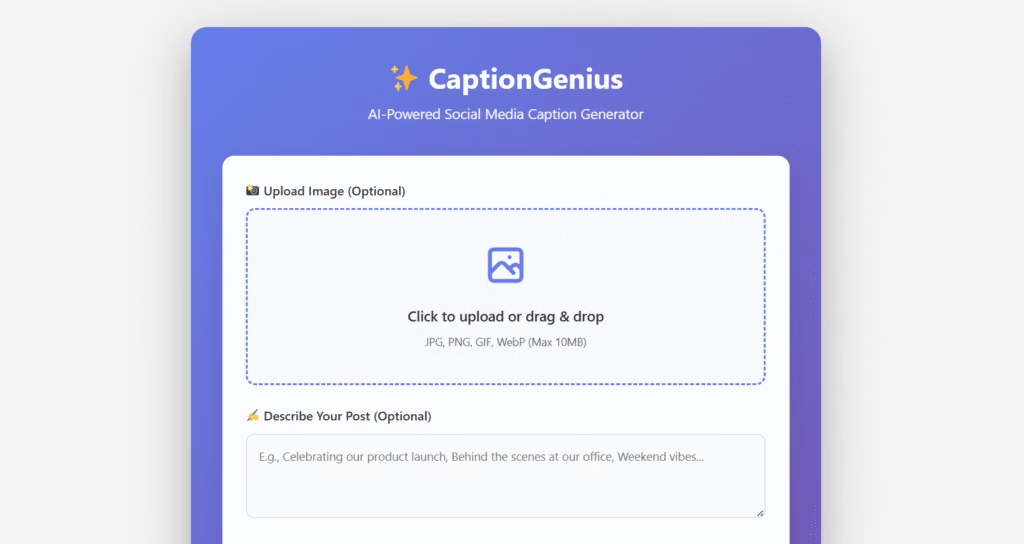
How Does CaptionGenius Work?
CaptionGenius is a completely free AI caption generator that makes creating captions effortless:
Step 1: Upload Your Image
Drag and drop or click to upload any image format (JPG, PNG, WEBP). The AI analyzes visual elements to understand context.

Step 2: Select Your Platform
Choose from: Instagram (story-driven, engaging), Facebook (conversational, community-focused), Twitter (concise, impactful), LinkedIn (professional, authoritative), TikTok (trendy, entertaining).
Step 3: Choose Your Tone
Professional (business/B2B content), Casual (friendly and relatable), Funny (humorous and entertaining), Inspirational (motivational and uplifting), Promotional (sales-focused with clear CTAs).
Step 4: Set Caption Length
Short (1-2 lines), Medium (3-5 lines), Long (full storytelling).

Step 5: Generate & Customize
Click generate and receive 5 unique caption options. Use as-is or customize to add your personal touch.

Key Features of the Best Free AI Caption Generators
- Image Analysis Technology — advanced AI should understand image content to generate contextually relevant captions.
- Multiple Platform Support — one tool for all platforms saves time and ensures consistency.
- Tone Customization — different audiences respond to different tones. Flexibility is key.
- Unlimited Generations — the best tools don't limit how many captions you can create.
- No Signup Required — immediate access without creating accounts or providing payment information.
- Mobile-Friendly — create captions on-the-go from any device.
Who Should Use a Free AI Caption Generator?
Handle multiple client accounts efficiently and create diverse content without sacrificing quality. Time saved: 15-20 hours per week. Cost saved: $500-1000/month vs. hiring writers.
- Small Business Owners — maintain consistent social presence without hiring full-time staff. Benefit: professional captions that drive engagement and sales.
- Content Creators & Influencers — post consistently without caption anxiety, focus on creating great content. Result: more time for creativity, less time on admin tasks.
- Marketing Agencies — scale social media services, deliver high-quality captions for multiple clients faster. Impact: serve more clients without increasing headcount.
- E-commerce Brands — create compelling product descriptions and promotional captions that convert. Outcome: higher engagement rates and increased sales.
Best Practices for AI-Generated Captions
- Always Review and Personalize — use AI as a foundation, then add your unique voice and brand-specific details.
- Add Relevant Hashtags — research and include 5-10 relevant hashtags for discoverability.
- Include Clear CTAs — tell your audience what action to take: like, comment, share, click, buy.
- Test Different Variations — generate multiple options and A/B test to see what resonates.
- Keep Brand Consistency — ensure AI-generated captions align with your overall brand messaging.
- Update for Current Trends — add timely references or trending topics to make captions more relevant.
CaptionGenius vs. Other AI Caption Generators
| Feature | CaptionGenius | Competitor A | Competitor B |
|---|---|---|---|
| Price | FREE | $49/month | $29/month |
| Platform Support | All major platforms | Instagram only | Instagram, Facebook |
| Tone Options | 5 options | 3 options | 2 options |
| Image Analysis | Yes | No | Limited |
| Signup Required | No | Yes | Yes |
| Generations | Unlimited | 100/month | 50/month |
| Mobile-Friendly | Yes | Limited | Yes |
Real Results: Case Studies
Small Business Owner:
"I was spending $400/month on a freelance caption writer. CaptionGenius gives me better results for free. My engagement is up 31%."
— Sarah M., Boutique Owner"We manage 12 client accounts. CaptionGenius saves us 20+ hours weekly. That's 1,040 hours per year we can spend on strategy instead of caption writing."
— Mike T., Agency Director (Social Media Agency)"I post 5 times daily. Before CaptionGenius, I'd spend 3 hours on captions. Now? 20 minutes. Game-changer."
— Priya S., Instagram Influencer (85K followers)Common Questions About Free AI Caption Generators
Straight answers to what people ask most before trying AI-generated captions.
Getting Started with CaptionGenius
- Try It Now — visit CaptionGenius and generate your first caption in 30 seconds.
- Experiment with Options — try different tones and lengths to see what works for your audience.
- Track Performance — monitor engagement on AI-generated captions vs. your previous captions.
- Refine Your Process — develop a workflow that combines AI efficiency with your personal touch.
A free AI caption generator isn't about replacing human creativity – it's about amplifying it. By handling the time-consuming mechanical aspects of caption creation, tools like CaptionGenius free you to focus on strategy, engagement, and growth. Whether you're a solopreneur managing your own accounts or an agency serving dozens of clients, AI-powered caption generation is no longer optional – it's essential for staying competitive in 2025's crowded social media landscape.
Start creating better captions in less time: Try CaptionGenius free today.